In today’s fast-paced digital environment, organizations depend on their hardware infrastructure more than ever. From laptops and servers to networking equipment and specialized machinery, hardware forms the backbone of operations. Yet many businesses overlook one of the simplest and most cost-effective strategies for protecting that investment: regular hardware maintenance.
It’s easy to assume that once hardware is purchased, it will reliably perform until it inevitably fails years later. But the truth is far more nuanced. Hardware components degrade, accumulate wear, generate heat, and are susceptible to environmental factors and user handling. Without routine upkeep, this degradation accelerates. With proactive maintenance, however, businesses can extend hardware lifespans by years, significantly reduce downtime, and extract far more value from their investments.
This blog explores the how and why behind regular maintenance and the powerful role it plays in delaying hardware replacement.
1. Understanding the Natural Lifecycle of Hardware
Every physical device experiences wear over time. Unlike software—which can be instantly patched or updated—hardware components physically deteriorate from use, environmental factors, and age.
Key factors in hardware aging include:
Heat exposure: The number-one enemy of electronics. Excess heat accelerates component failure.
Mechanical wear: Moving parts such as cooling fans and hard disk drives inevitably decline.
Dust and debris accumulation: Dust restricts airflow, traps heat, and clogs ports.
Electrical stress: Power fluctuations and surges wear out internal capacitors and sensitive circuits.
User handling: Frequent plugging/unplugging, drops, and improper storage all add stress.
Over time, these factors degrade performance and stability. But maintenance can counter many of them—slowing down wear, preventing failures, and giving hardware a “second life.”
2. Why Regular Maintenance Makes Such a Big Difference
The power of hardware maintenance lies in its ability to detect, prevent, and correct issues long before they lead to breakdowns. Instead of reacting to failures, maintenance creates a preventative shield.
2.1 Keeps Components Running at Optimal Efficiency
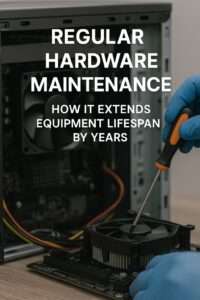
Dust-filled fans, clogged vents, aging thermal paste, and dirty ports can dramatically impact performance. Excess heat causes throttling, weakens solder joints, and shortens component lifespan.
Regular maintenance restores optimal conditions by:
Cleaning dust from vents and fans
Reapplying thermal paste

Ensuring proper airflow
Removing debris from ports
Testing for abnormal temperature fluctuations
When hardware runs efficiently, it ages more slowly—just like cars that receive routine oil changes and alignments.
2.2 Prevents Small Problems From Becoming Big Ones
Most catastrophic hardware failures start as minor, easily fixable problems:
A slightly noisy fan becomes a seized motor.
A loose cable becomes a system outage.
A swollen capacitor becomes a dead motherboard.
A minor hard drive error becomes total data loss.
Routine maintenance identifies and resolves these issues while they are still inexpensive and easy to fix. By catching problems early, organizations avoid the domino effect that leads to full replacements.
2.3 Extends the Usable Lifespan of Every Component
The usable lifespan of hardware depends heavily on how it’s treated. For example:
HDD life expectancy can vary by years depending on heat exposure.
Well-maintained cooling systems can double the lifespan of CPUs and GPUs.
A clean power supply can run reliably for a decade or more.
Maintenance slows aging and reduces the stress components endure, unlocking years of additional performance.
2.4 Reduces Unexpected Downtime
Improperly maintained hardware fails at higher rates—and typically at the worst times. For businesses, unexpected downtime means:
Lost productivity
Missed revenue
Delayed customer deliverables
Emergency repair costs
Potential data losses
Planned maintenance avoids these hidden costs and ensures smooth, predictable operations.
2.5 Costs Far Less Than Replacement
Full replacement of hardware—especially servers, industrial machinery, or networking gear—can cost thousands, tens of thousands, or even millions of dollars. In comparison, maintenance costs are a small fraction of that investment.
The ROI is clear:
Spend a little now → save a lot later.
Extend lifespan → maximize value from initial purchase.
Reduce emergency expenses → avoid financial shocks.
Even for small businesses, this difference can be substantial.
3. Common Maintenance Tasks That Significantly Extend Hardware Lifespan
Maintenance isn’t complicated or time-consuming when done correctly. The following practices can add years to a device’s life.
3.1 Cleaning and Dust Removal
Dust causes overheating, electrical shorts, and fan failure.
Maintenance includes:
Cleaning vents and fans
Blowing out dust with compressed air
Cleaning ports and connectors
Wiping surfaces to prevent buildup
This single step alone can prevent many heat-related failures.
3.2 Thermal Management
Many devices accumulate heat due to weak cooling or hardening thermal paste.
Maintenance includes:
Reapplying CPU/GPU thermal paste every 2–3 years
Replacing aging or noisy fans
Ensuring adequate ventilation
Monitoring system temperatures
Proper cooling dramatically extends component life.
3.3 Hardware Health Checks
Early detection prevents catastrophic failures.
Routine health checks monitor:
Hard drive SMART data
Fan speeds
Power supply voltage levels
Memory errors
Motherboard capacitor condition
Battery health (for laptops and UPS systems)
Spotting anomalies early prevents expensive damage.
3.4 Cable, Connector, and Port Maintenance
Loose connections often lead to intermittent failures and data corruption.
Maintenance includes:
Inspecting cables and replacing damaged ones
Ensuring connectors are firmly seated
Cleaning ports
Testing for connectivity issues
This stops many “mystery errors” before they cause downtime.
3.5 Power Protection
Electrical issues are a silent killer of hardware.
Regular maintenance ensures:
Surge protectors or UPS systems are functional
Power supply units (PSUs) aren’t overheating
Outlets and circuits aren’t overloaded
This protects devices from unexpected electrical damage.
3.6 Firmware and Low-Level Updates
While not physical, firmware updates contribute to system longevity by improving efficiency and stability.
Examples include:
BIOS/UEFI updates
SSD firmware updates
Router/switch firmware upgrades
Device-specific microcode patches
Combining software and hardware maintenance creates optimal conditions for longevity.
4. The Hidden Benefits of Consistent Hardware Maintenance
Beyond delaying replacement, maintenance delivers several powerful secondary advantages.
4.1 Improved Performance and Speed
Well-maintained devices run faster due to:
Better cooling
Cleaner power delivery
Reduced errors
Less thermal throttling
This helps employees stay productive and reduces user frustration.
4.2 Greater Device Stability
Tasks such as cleaning, diagnostics, and replacing failing components improve reliability. This reduces:
System crashes
Blue screens
Freezes
Random shutdowns
Stable hardware means stable operations.
4.3 Enhanced Data Protection
Many failures—especially storage-related ones—can be predicted and prevented through maintenance. Early intervention protects:
Business documents
Databases
Customer information
Intellectual property
Replacing a drive is cheap. Recovering lost data is not.
4.4 Environmental Sustainability
Extended hardware lifespan reduces electronic waste. Fewer replacements mean:
Less landfill contribution
Lower manufacturing-related environmental impact
Better use of existing materials and energy
Organizations committed to sustainability benefit immensely from maintenance.
4.5 More Predictable Budget Planning
Rather than sudden multi-thousand-dollar surprises, maintenance leads to:
Scheduled expenses
Planned upgrades
Better budgeting visibility
Finance teams gain increased stability and predictability.
5. How Maintenance Can Delay Replacement by Years (Realistic Scenarios)
Here are some practical examples of how maintenance translates directly into longer hardware life.
Scenario 1: Extending Server Lifespan
A server typically lasts 5–7 years. Without maintenance, this can shrink to just 3–4 years due to heat buildup and dust. With proper upkeep:
Thermal paste replacement
Dust removal
Fan upgrades
Power protection
…many servers reliably operate for 8–10 years or more.
Scenario 2: Laptops and Workstations
A well-maintained laptop may last 6–8 years:
Regular fan cleaning
Battery calibration
Thermal paste refresh
SSD and RAM upgrades
Neglected laptops often fail after 3–5 years.
Scenario 3: Network Infrastructure
Switches, routers, and access points often run nonstop for years. Maintenance keeps them healthy:
Firmware updates
Cooling and airflow checks
Power conditioning
This can extend their service life from a typical 5 years to 8–10 years.
Scenario 4: Industrial or Specialized Hardware
These systems are expensive to replace. Routine inspections, cleaning, and part replacements can delay total replacement by multiple years—saving organizations significant capital.
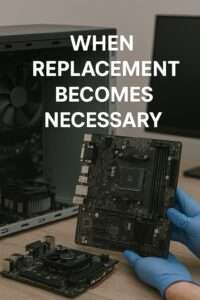
6. When Replacement Becomes Necessary
While maintenance can delay replacement, it can’t stop time entirely. Hardware eventually becomes:
Obsolete
Incompatible with modern software
Too slow for current workloads

More expensive to repair than replace
However, maintenance ensures that:
Replacement timelines are predictable
Upgrades can be planned and budgeted
Hardware reaches its full value potential
The goal is not to avoid replacement forever, but to time it intelligently.
7. Building a Strong Maintenance Strategy
To maximize hardware lifespan, organizations should implement a structured maintenance program.
Key components include:
Scheduled cleaning cycles (every 3–6 months)
Annual deep inspection of internal components
Quarterly hardware diagnostics
Environmental control (temperature, humidity, airflow)
Documentation of maintenance activities
Employee training on proper device care
A proactive plan yields the highest return on investment.
Final Thoughts: Maintenance Isn’t Just Helpful—It’s Essential
Regular hardware maintenance is not an optional luxury. It is a critical operational practice that:
Extends hardware lifespan
Reduces unexpected downtime
Protects data and productivity
Saves money
Supports sustainability
Keeps systems running smoothly
Organizations that invest in regular maintenance routinely see their hardware last years longer than those that do not. In a time when hardware costs continue to rise, extending the life of existing equipment is not just smart—it’s strategic.
By prioritizing maintenance, businesses gain better performance, stronger reliability, reduced expenses, and a more sustainable infrastructure. In short: maintenance turns hardware from a disposable asset into a long-term investment.